Analog-Digital Clock Wallpaper1.53
Publisher Description


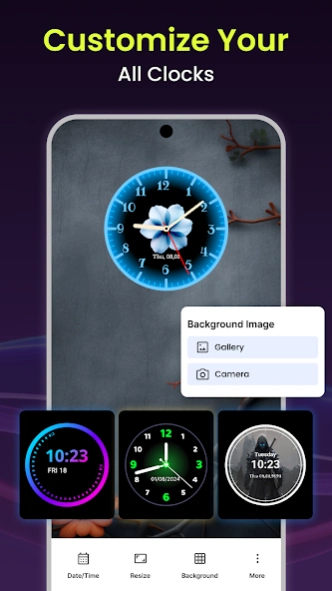
Digital, neon, and analog clock wallpaper with stylish clock faces
Analog-Digital Clock wallpaper is a clock wallpaper app that provides digital & analog clock wallpapers for your phone. You can choose the clock wallpaper of your choice. The Clock wallpaper app offers a user-friendly interface. You can easily set a clock wallpaper on your phone screen using the Analog Clock Wallpaper app.
Analog clock wallpaper provides the features of an analog clock, digital clock, neon clock, text clock, and wallpaper. Digital clock wallpaper has different designs of clocks that show time and date on your phone’s screen. This Neon clock wallpaper app also has an alarm clock feature. You can set an alarm with your favorite mission by using the digital clock wallpaper app.
Key features of Analog digital clock wallpaper
✔️ Clock wallpaper has a simple and intuitive design of clocks.
✔️ Bright neon clock makes time easy to read.
✔️ Set alarms in just a few clicks with an alarm clock.
✔️ Choose from a collection of clock faces
✔️ Digital clock allows you to adjust clock position, fonts, background, and more.
Analog clock wallpaper
Clock wallpaper app has the feature of an analog clock wallpaper that allows you to display a clock face on your phone’s screen. The clock face includes hour and minute hands to show the time. You can set the clock face of your choice with any background.
Digital clock wallpaper
Digital clock wallpaper displays the current time on your screen in a digital style. You can customize the clock style by changing the font, color, size, and position to fit your clock by using the digital clock app. You can adjust the clock in the center or a small one in the corner.
Alarm clock
The Analog Clock Wallpaper app has an alarm clock feature. You can set daily alarms from the clock wallpaper app. No need to use a separate alarm app, you can get both a clock wallpaper and an alarm clock in one app
Neon clock wallpaper
Neon clock wallpaper brings a glowing, colorful clock to your screen. Analog-digital clock wallpaper displays the current time in bright neon style light. Neon Clock Wallpaper makes your screen look lively and helps you check the time easily.
Text clock and wallpaper
Text clock wallpaper gives you positive vibes & keeps you motivated with positive Quotes
The Clock app also has a wallpaper feature that includes a collection of wallpapers.
How to use the Analog-Digital clock wallpaper app?
✔️ Open the Analog-Digital clock wallpaper app
✔️ Select a clock wallpaper.
✔️ Choose a background or use your image
✔️ Customize the clock font and size.
✔️ Press “Apply” to set your clock wallpaper
Get the Analog-Digital clock wallpaper app and personalize your time display with different clock faces and wallpapers.
About Analog-Digital Clock Wallpaper
The company that develops Analog-Digital Clock Wallpaper is StationApp Spot. The latest version released by its developer is 1.53.
To install Analog-Digital Clock Wallpaper on your Android device, just click the green Continue To App button above to start the installation process. The app is listed on our website since 2026-05-19 and was downloaded 3 times. We have already checked if the download link is safe, however for your own protection we recommend that you scan the downloaded app with your antivirus. Your antivirus may detect the Analog-Digital Clock Wallpaper as malware as malware if the download link to com.digitalclocks.smartclockdesign.app is broken.
How to install Analog-Digital Clock Wallpaper on your Android device:
- Click on the Continue To App button on our website. This will redirect you to Google Play.
- Once the Analog-Digital Clock Wallpaper is shown in the Google Play listing of your Android device, you can start its download and installation. Tap on the Install button located below the search bar and to the right of the app icon.
- A pop-up window with the permissions required by Analog-Digital Clock Wallpaper will be shown. Click on Accept to continue the process.
- Analog-Digital Clock Wallpaper will be downloaded onto your device, displaying a progress. Once the download completes, the installation will start and you'll get a notification after the installation is finished.
Program Details
System requirements
Download information
Pricing
Version History
version 1.51
posted on 2026-05-19
Bugs Fix
version 1.53
posted on 2026-05-19
Crash Resolve
version 1.50
posted on 2026-04-20
version 1.47
posted on 2025-11-01
🕰️ Trending Analog Clocks Wallpaper
💡 Neon Clocks, 📟 Digital Clocks & ⌚ Text Clock Wallpapers!
🎨 Enjoy full Customization for all Clock Styles
⏰ Alarm Clock for Heavy Sleepers – Never oversleep again!
📱 Stunning Wallpapers to light up your Home Screen!
